When to use it
Use a domain that includes zero and every supplied measurement. Localize targetLabel and labels for the application.
Compare an actual value with a target and labeled performance ranges.
Apple availability
Import LumenUI in the target that uses this component. iPad support follows the iOS package baseline and uses native iPad layout behavior.
Native example
Use a domain that includes zero and every supplied measurement. Localize targetLabel and labels for the application.
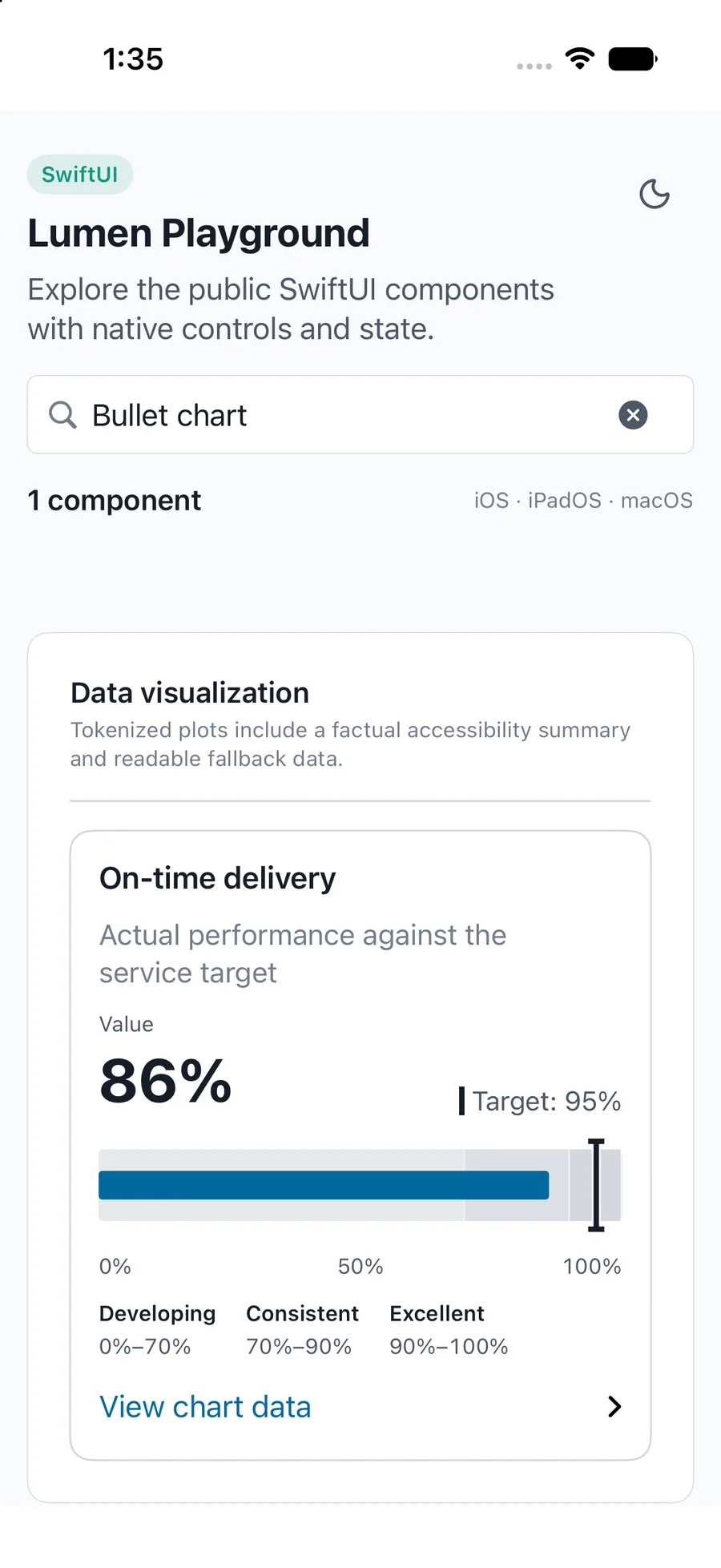
LumenBulletChart(label: "On-time delivery", value: 86, target: 95, domain: 0...100)Reference
The primary shared and platform-specific options exposed by LumenBulletChart.
| API | Values or type | Default | Description |
|---|---|---|---|
| value, target | Nullable measurement, finite target | Required | Null is unavailable; zero is a measured value. |
| ranges | LumenBulletRange[] | [] | Uses labeled finite range ends sorted without changing the source data. |
| domain | Finite numeric range | Automatic | Includes zero, target, actual, and all ranges; invalid input fails closed. |
| labels, targetLabel, valueLabel | Localized chart labels | English | Labels the summary, visible measurements, and exact data list. |
| showData | Boolean | true | Provides the expandable actual, target, and range boundaries. |
Native behavior
Use a domain that includes zero and every supplied measurement. Localize targetLabel and labels for the application.
Exposes exact actual, target, and range values; missing values remain distinct from zero.
Shared component